Quick Summary: WaaS is a subscription service that handles website design, hosting, security, updates, and support for a monthly fee, simplifying management and reducing vendor hassle. It turns website work into an ongoing service, with providers managing everything from launch to maintenance. Unlike traditional hosting or one-time projects, WaaS offers continuous support and ownership clarity, making it ideal for small businesses seeking a hands-off approach. When choosing a WaaS provider, ask about ownership, included services, costs, and security guarantees.
A California law firm, nonprofit, or local service business can buy WaaS solutions and get design, hosting, security, updates, and support in one monthly plan. That solves a common mess: too many vendors, surprise costs, and unclear ownership. This guide explains how WaaS solutions, Website Management Service plans, and Managed Website Hosting compare, what WaaS solutions usually include, and how to judge fit with a buyer-first lens.
What Website as a Service Actually Includes
WaaS is a subscription service, not just a website build. Like SaaS, the provider manages the tool and ongoing upkeep while you pay for use over time, not one-time ownership, as explained in Wikipedia’s SaaS overview.
The core idea is simple:
- You avoid a large upfront project
- You get one monthly fee
- The provider keeps the site running, updated, and supported

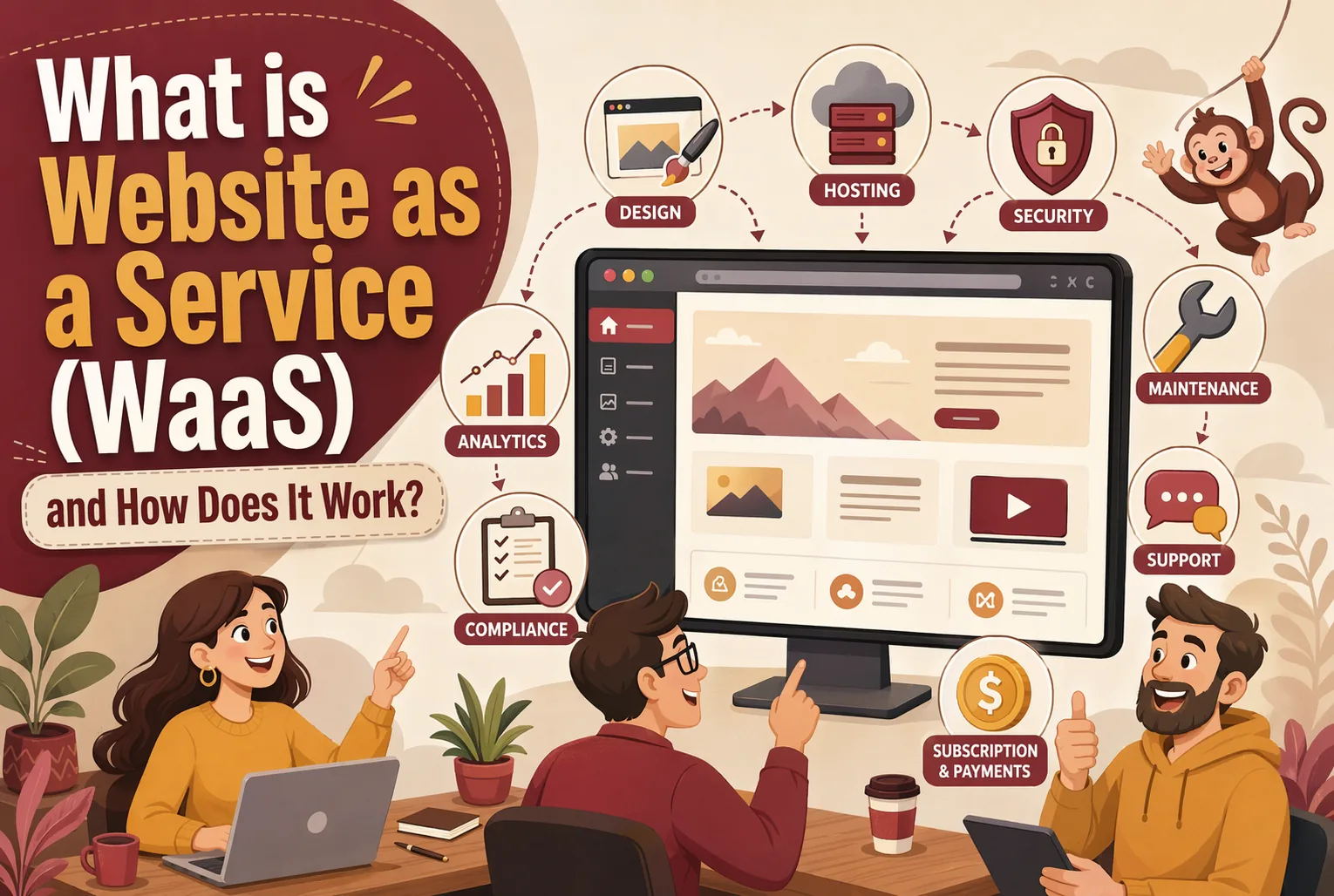
What gets bundled varies, but most WaaS plans include:
- Design and setup
- Hosting
- Security updates
- Backups
- Bug fixes
- Content edits or support
- Ongoing maintenance
Some providers also add SEO basics, reports, or compliance help. TechTarget notes that in SaaS, the provider usually handles maintenance and infrastructure, which mirrors how many WaaS plans work in practice through a managed subscription model.
Always ask what is included each month versus billed as extra work.
Also Read: ADA Compliant Website Design: What Your Business Needs to Know
How WaaS Works From Launch to Ongoing Management
WaaS turns website work into a managed monthly service. You get a site launched fast, then the provider handles the fixes, updates, and support that usually pile up after launch.
Onboarding, discovery, and content collection
The process starts with intake. Your provider gathers goals, services, brand files, logins, and page content. Many teams also map key pages, forms, and calls to action so the site fits how your business actually sells.
Design, development, and launch
Next comes design and build. The provider creates layouts, adds copy and images, sets up forms, and checks mobile use. A CMS helps teams keep content moving after launch, as the U.S. Chamber explains.
Ongoing updates, support, and optimization
After launch, WaaS keeps running. That often includes edits, plugin updates, backups, uptime checks, and speed fixes. Security updates matter – WordPress recommended immediate updates in its 6.9.4 security release.
Also Read: 10 Must-Have Professional Website Design Elements for U.S. Small Businesses
WaaS vs Traditional Hosting and Project-Based Web Design
Traditional hosting gives you server space, backups, and maybe security tools. You still manage the site, updates, plugins, and design work yourself or hire help. WaaS wraps those pieces into one service, so the provider handles the live site too, not just the server, as explained by Gutena Forms.

A one-time website project is different too. You pay for design and build, then the job usually ends at launch. Ongoing edits, fixes, and growth often need a new quote or retainer. WaaS keeps the relationship active with recurring support, hosting, and updates, while custom freedom may be lower, according to InstaWP.
Also Read: Turnkey Website Solutions: What to Expect in 2026
How to Evaluate the Right WaaS Solution for Your Business
Questions to ask before you sign
Ask direct questions before you choose a WaaS provider. The FTC says security should be a top concern, and you should confirm who handles updates, website management, and key protections like TLS and email authentication when hiring a web host. Use this quick checklist:
- Who owns the domain, content, and design?
- Can I leave without losing my site or data?
- What is included each month, and what costs extra?
- Who makes edits, and how fast?
- What happens if the site goes down or gets hacked?
Get promises in writing. The FTC also advises businesses to spell out security expectations in contracts and verify providers follow them.

If you want a done-for-you WaaS option, see how Monkey Business handles design, hosting, updates, security, and support so you can stay focused on running your organization.
Frequently Asked Questions
Q1: What exactly is Website as a Service (WaaS) and how does it differ from traditional web hosting?
WaaS bundles design, hosting, updates, support, and maintenance into one monthly service. Traditional hosting usually gives you server space only, so you still manage the site, plugins, fixes, and vendors yourself.
Q2: How does Monkey Business’s WaaS solution streamline website management for small US businesses?
Monkey Business handles setup, hosting, edits, security, and support under one plan. That saves time, cuts tech stress, and helps small teams avoid juggling freelancers, software, and separate website bills.
Q3: What are the key features included in a typical WaaS package offered in the United States?
Most WaaS plans include website design, hosting, SSL, backups, updates, basic SEO setup, support, and ongoing maintenance. Some also include content edits, compliance help, analytics, and performance monitoring.
Conclusion
WaaS means you pay for a website as an ongoing service, not just a one-time build, which fits the broader as-a-service model. The best choice depends on included support, limits, ownership, and your need for hands-off website management.