
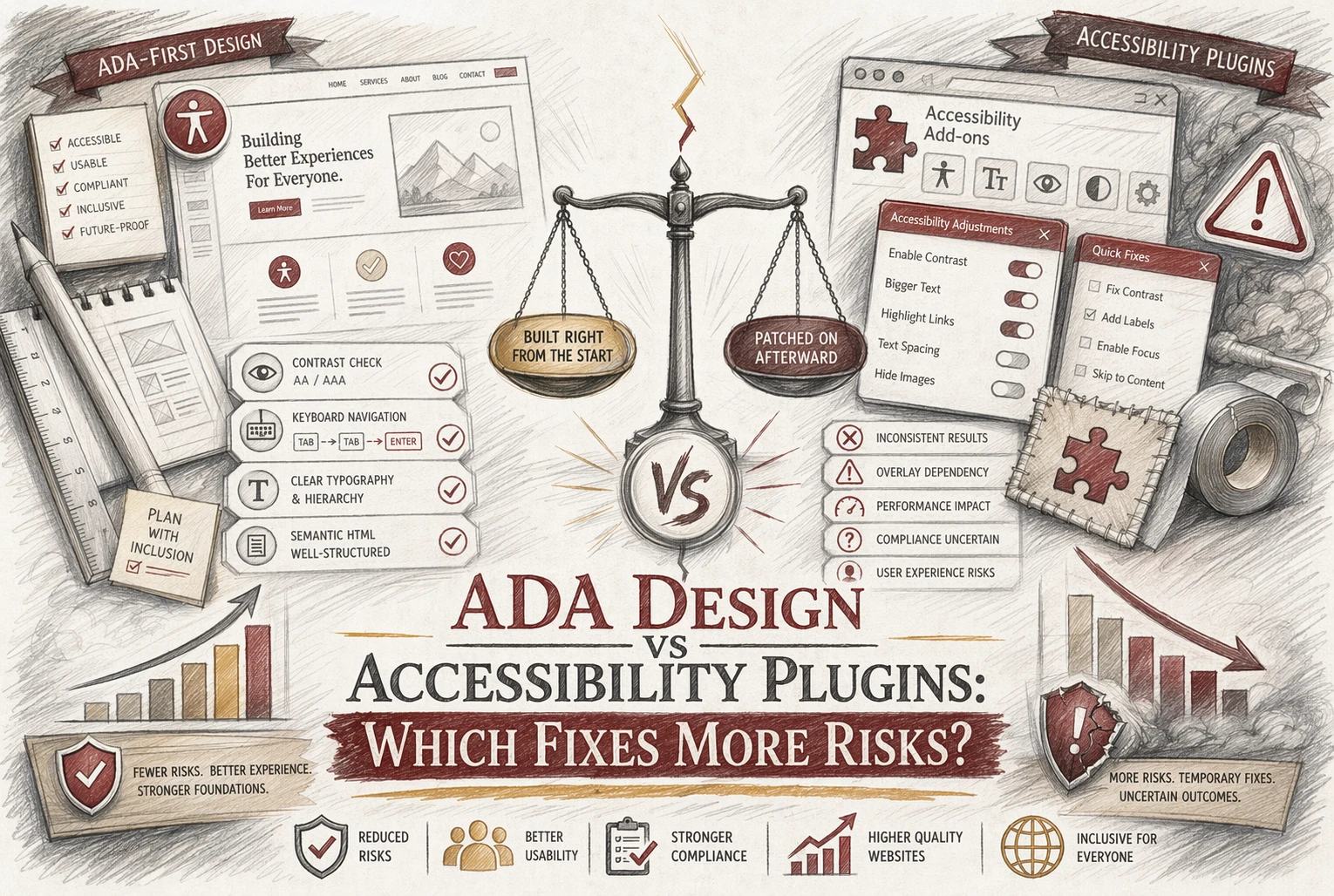
Quick Summary: ADA design fixes address the actual code and structural barriers on a website, reducing legal and accessibility risks more effectively than plugins. While plugins offer quick usability improvements, they cannot reliably fix underlying issues like forms, headings, or alt text. For strong risk mitigation, businesses should prioritize source-level remediation over relying solely on accessibility overlays. Combining both approaches can help, but real code fixes provide the most defensible compliance.
US businesses facing lawsuit risk need a clear answer: ADA Design Issues usually create more exposure than Accessibility Plugins can fix. Small teams want lower Website Accessibility Risks without wasting money. We work from real audit patterns, claim trends, and remediation practice. This comparison shows where ADA Design Issues need code-level fixes, where plugins help, and which ADA Design Issues deserve priority first.
ADA Design vs Accessibility Plugins: At a Glance
| ADA design | Accessibility plugins | |
|---|---|---|
| Risk reduction | High, because it addresses underlying barriers | Partial, useful but not complete |
| What it changes | Source code, content structure, forms, navigation, contrast | Widget controls and some automated adjustments |
| Best for | Defensible ADA/WCAG risk mitigation | Supplemental usability features and quick wins |
| Limitations | Requires audit, development, and ongoing review | Cannot reliably fix all structural accessibility issues |
| Implementation effort | Moderate to high | Low to moderate |
How ADA design and Accessibility plugins Compare
ADA design
ADA design means fixing the site itself. It suits businesses that want stronger ADA and WCAG risk control by changing code, structure, forms, navigation, and contrast.
Key strengths
- Fixes underlying barriers
- Better for defensible risk reduction
Accessibility plugins
Accessibility plugins add a widget, user controls, scans, and some automated fixes. They fit teams that need quick support features fast, but they do not fully solve deeper structural issues.
Key strengths
- Fast to add
- Helpful for quick usability improvements
Which option reduces ADA website risk more effectively?
Source-level fixes reduce more risk. They change the actual code, content, and structure that audits test and users depend on. The DOJ’s web rule for public entities points to technical standards, not widgets layered on top of broken pages, as shown in the ADA.gov compliance guide. The FTC also took action in 2025 against claims that an automated overlay could make any site compliant, in its accessiBe order announcement.

Plugins still help in a limited way:
- add user controls like contrast or text size
- flag obvious issues fast
- support short-term triage on large sites
Useful plugin features can improve usability, but they do not replace design remediation, keyboard fixes, form labels, heading structure, or alt text.
Also Read: Accessible Web Design Services vs DIY Tools: Costs and ROI
What each approach fixes-and what it leaves exposed
Structural barriers that design must resolve
Real ADA risk drops when you fix the site itself. That means heading order, form labels, keyboard focus, menu logic, error handling, alt text, table markup, and color contrast in source code. DOJ guidance for public entities points to specific web and app access rules, not toolbar shortcuts, in its web accessibility fact sheet.

Why plugin-only fixes leave residual risk
A plugin may help with font size, contrast toggles, or pausing motion. It does not reliably repair broken structure underneath. The FTC alleged one major overlay vendor failed to make basic items like menus, headings, tables, images, and recordings accessible in many cases, per the FTC complaint.
A widget can add options. It cannot replace real remediation.
Also Read: 5 Essential Tips for Selecting a Reliable Website Security Provider
Which Should You Choose for your business?
Choose ADA design first if risk reduction is the priority. DOJ says businesses open to the public must make online goods and services accessible, and its guidance points to real barriers like forms, alt text, captions, and keyboard access, not just toolbar settings DOJ web accessibility guidance.
Use a plugin only as a supplement. A widget may help some users with display controls, but it does not fix deeper code, content, or navigation problems. The American Bar Association notes overlays are quick fixes and are not recommended as the full answer for Title III risk reduction ABA accessibility risk guidance.

Skip patchwork fixes. Get a defensible, done-for-you ADA-friendly website with Monkey Business and reduce risk faster.
Frequently Asked Questions
Q1: How do ADA compliance elements differ between ADA Design and accessibility plugins?
ADA design fixes source issues like heading order, keyboard access, contrast, forms, and labels. Plugins mostly add front-end controls. They may help some users, but they usually do not repair the code problems that trigger complaints.
Q2: What are the legal risks of relying solely on accessibility plugins for compliance?
The main risk is false confidence. A plugin can sit on top of barriers while the site still fails keyboard, screen reader, or form tests. If a claim comes, you need real fixes, not just a widget.
Q3: Which accessibility fixes provide the most comprehensive risk mitigation for US businesses?
Start with structural fixes: semantic HTML, keyboard navigation, form labels, alt text, color contrast, focus states, error handling, and captioned media. That approach lowers risk more than overlays and gives you stronger proof of good-faith effort.
Conclusion
ADA design fixes reduce risk better because they repair real barriers. Plugins may help a little, but DOJ guidance still centers accessible results, not overlays or shortcuts ADA web guidance.